29 November, 2007

14 November, 2007
A drive around the block
You bought what?
It seems I made just a bit of a boo boo when I purchased a DVD drive recently. The specs on it were very nice (supports DVD-R,+R,-RW,+RW,-RAM, CD-R, etc etc). The price was even better. So I bought it, and brought it home, but it wasn't until about half an hour after I actually got it home that I realised I'd made a small mistake in purchasing it. Yes, it works fine. No, it wasn't misrepresented in its advertising. So, I can't actually take it back because it doesn't work, or it doesn't do the job advertised in its marketing. No. My problem was, I didn't click to the fact that it was only a DVD reader, and not a writer. I could have saved myself the purchase cost of that drive, and added a bit of money, I might have had a writer. Never mind, it'll go into fatty as a reader, fine. Solaris recognises it, Ubuntu recognises it.But the sun is eclipsed by the moon
Yes, I've reinstalled Eclipse, after upgrading my JDK, of course. I was aware of Callisto (Eclipse 3.2) but wasn't aware of Europa (Eclipse 3.3) so I had a pleasant surprise when I got to the download site all ready to download my copy. I'd already grabbed J2SE6 and docs to go with it, and I'd also upgraded my copy of NetBeans to 5.5 as well as installing a couple of useful plugins for non-Java coding. So I went ahead and downloaded Europa. I must say that Netbeans is considerably smaller than Eclipse, by some really significant margin. That was reflected in the long time it took to download both Eclipse itself, and some of the other plugins I wanted. On top of that, there are way way more plugins available for Eclipse. I'm still not sure yet what I'll use on an ongoing basis, though I have downloaded pretty much anything I'm likely to use, as well as possibly stuff I may never use.Back to the books
I've been getting back into books recently, reading a bit of Stephen King (good writer, that), Thomas Harris (Hannibal fame), and Stephen Donaldson. Incidentally, he's just come out with a second part to his "Last Chronicles of Thomas Covenant" series. As with his other previous series, this one looks like it'll be another three-parter too. I ended up finishing "Firestarter" in just over a week - not fast for me, but faster than I have been reading books up until recently. With that in mind, I've got out two other Stephen King novels: Christine, and Cell. Anyhow, guess I've nothing else much to say.10 August, 2007
Worms play with guns
Why are worms involved in warfare?
I have found a game I can actually play under Wine! Yes, I know people say you can play heaps of games from wine, but I haven’t found that to be the case. Of all the CD programs I’ve tried, only three seem to work under wine. And one of them is a little classic—literally. Anyone who remembers the DOS game Worms, will be familiar with these little creatures from Team17 whose mission seems to be to annihilate everything and everyone else in sight, except for themselves of course. No screenshots, as I’m probably going to violate various licence agreements if I do.Not a great taste in wine
You might ask why on earth I want to run such a game under wine when I could simply run it on Windows instead, and gain the benefits of running the game properly, on an operating system for which it was designed. I’ll explain why. I seem to use Windows about once every six months at the moment, if that. I use Linux for 99% (or more) of the time that I’m on the computer, and I don’t want to be tied to the Windows platform any more. Not that I have much choice, as most games are written for Windows first, and maybe Linux gets a thought in after that. I was familiar with Worms 2 and Worms World Party, having installed them under Windows at one stage, and watching while worms blew each other to bits with insane weaponry, and spouted totally corny lines I just had to laugh at. Just today, I was lamenting the fact I couldn’t get most of my other games running under Wine (nor, for that matter, the games that zoombuggy has collected - more on that later), because they wanted stuff that wine simply didn’t provide. And this was using the latest available wine sourcecode, so it’s not like I was not keeping up with the play. So, I decided to try out the copy of Worms 2 I had sitting up on the shelf, all unused and unplayed.Awww. That’s a sad story.
Anyhow, I stuck the CD in and mounted it, and executed the installer—once I found it, that is. It did the normal thing that installers do, copied a bit of data on to the hard drive (don’t they all), and tried to display the README using write.exe, which I don’t actually have. Hey, that didn’t matter, the game was installed. When I ran it, Worms came up with all the relevant graphics, sound and action - so I’m stoked, as that’s one game that actually works.You mentioned zoombuggy
Unfortunately, zoombuggy is not as fortunate as myself. For starters, she doesn’t have a CDROM drive, so she can’t install games even if she wanted to. Secondly, we’ve tried all of the games she owns under wine, but none of them want to work under anything but DOS or Windows. And because she doesn’t have a CDROM drive, most of them won’t run as they require the CD mounted before they’ll play. It’s beside the point that she doesn’t have a running Windows install at the moment, due to her having changed machines twice in the past 12 months.Has she found any games she can play?
Yes, she has, though they are Linux games, of course. Suffice it to say that she enjoys them, and has a good time playing them. And with that, I’ll sign off.07 August, 2007
Back to the Cube
It’s tiny, Dad!
Nearly a couple of months back, I wrote here about the big Rubik’s Revenge cube that I bought, and the normal Rubik’s Cube. Today, I finally bought the tiny one, for the sum total of only $12.95— quite cheap, really.
 So far, I’ve already scrambled it, put it back together (that surprised me!), AND scrambled it again. It might only have three million combinations (hah. only he says), but it's proving slightly tricky to put it back to rights. As with its really big brother, the 4x4x4 Rubik’s Revenge, it came with its own Solutions Booklet. Most of the pages described what a face was, what colours were on the cube, and what was in the pamphlet. Of the 16 pages, only one page showed actual moves that could be used on the cube to swap pieces around or to rotate them. Yes, this cube only has three sets of moves that get used to solve it.
Sell! Sell! Sell!
Oh yes, and the obligatory marketing for more of the Rubik’s products. For example, until today, I was unaware that there was also a Rubik’s Tangram (14 tangram pieces, which can of course be combined into many clever diagrams. I don't (yet) think I’ll be buying this one, much as I like playing with tangrams. As an aside, there is a Gtk program called gtans which shows a variety of shapes to fill in using the pieces. Quite challenging for some people. Anyhow, I’m sure you’ve all seen some of the other products produced as part of the company.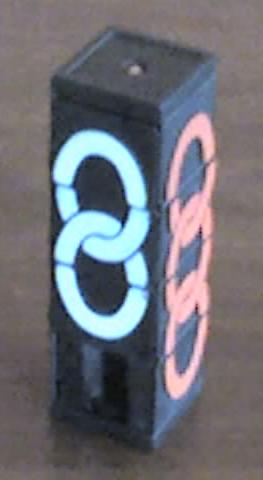 I came across one a couple of weeks after I bought the Revenge. It was a darn sight simpler, known as the “Missing Link.” You’d think it was relatively simple, but there’s a slight twist to it. Isn’t there always? The twist is—you can’t move the two middle sections independently, as they’re fixed in place, though you can still slide tiles through them. So really, it’s like a reorganised “15” puzzle. It took me quite a few minutes, but I solved it. Better results than I get with normal 15-puzzles.
Tick tock, time’s a’ running out
One other puzzle that I already have from the Rubik’s family I forgot to mention is the Clock puzzle. It’s got two sides, and nine clock faces on each side, linked by cogs and sliding elements that make it just a bit more tricky than you’d normally expect. Of course, the aim is to set all the clocks to 12 ’clock. Laughs can be had by seeing if you can set each clock from 1 through to 9—I haven’t found out if this can be done yet. According to the wikipedia page for the puzzle, it’s a lot easier than the other puzzles, purely because the clock faces are linked.
Acknowledgements
And with that said, I must thank the authors of the related wikipedia.org articles I used for this blog, and also my thanks go to the owner of the Missing Link picture.01 July, 2007
Another day of SUNshine
What, again?
Yes, only this time I had a little more room than before. The previous hard drive only had 3.2GB of space on it in total, so I had to leave some packages off the hard drive from the full install of Solaris 10. A few days ago, a friend of mine offered to send down two complete computer cases with motherboard and CPUs if I were to pay the postage. Funnily enough, zoombuggy agreed, as the idea was that she’d get her own computer back, with its own hard drive, and without any of my schlock on it. So we got them sent down, and I had a play.They’re quiet, Jim
Yes, they’re quiet, and they’re also custom. The little ENS Compaqs quite often are. These machines are no exception, as they have Pentium-II motherboards, but they have Pentium-III CPU cards in them. Weird. One’s a 600 MHz CPU, the other is a 450 MHz CPU, so they're both slow, but not totally crawling. They also have (almost) tool-less cases. Again, weird, but I could get used to it. The main disadvantage is: there is only 128MB of memory in each machine, in two 64MB SDRAM sticks. So I’m now waiting for an awful lot of 128MB or 256MB SDRAM sticks that I can put into three computers. To make it worse, Kubuntu 7.04 doesn’t like having less than 256MB, and is running as slow as water on fire - personally I’ve found it runs okay with 384MB.So now what happens?
Well, each of the computers had a 10GB drive. As one drive already had a complete Kubuntu 7.04 set up on it, I just moved on in, and got zoombuggy’s data shifted over. It seems funny, but I’d been wanting to upgrade her rather old Hoary Hedgehog installation (where do they come up with these names, anyhow?) for a while, and here I was, boom - up one distribution already, and without having to download a CD or DVD image. That was zoom and zoombuggy all jacked up, and I was up by one 4.3GB drive - that’ll probably have NetBSD put back on to it. The other machine (the 450 MHz) got the hard drive ripped out of it, which I used in fatty for the new Solaris install. Meanwhile (yes, I’ll get back to Solaris in a minute, Laura - just hold your horses) to make actual use of the machine and not have it lying around without a purpose, I put the Plan 9 drive into it. It works really REALLY well, in fact I’m frankly astounded. So, now my Plan 9 install has a machine all to itself. Once I corrected the IP I was using, and changed the hostname, it was good to go. I just wish it could get more use, but screens are at a premium here—I’ve only got two working screens, and I have to repair the third.And now, the story about Solaris?
Yes Laura, on to Solaris. Well, as I said in the first paragraph, I had nowhere near enough room on the original drive, so I took the DVD writer out of brick and stuck it into fatty, so I could install Solaris on to the 10GB drive, and finally install everything off the DVDs that I had. I had to migrate a wee bit over from the original drive, such as the beta for Flash 9 player (yes, there IS one for Solaris x86), and the OSS commercial sound driver software - more on that in a bit. Now I’m the happy owner of a Solaris install that actually has all of its bits and isn’t missing anything. I also added Sun Studio 11 (it already had GCC) and NetBeans 5, but found the machine simply wouldn’t run the Java Studio Creator without bogging down. I guess that 256MB really isn’t enough, as I read the requirements afterward and found that 1GB would have been more like it. Of course, Solaris comes with Star Office 7, and a reasonably complete Motif 2.1 install, so I’ll at least have a bit of stuff to learn - and, it even has a complete install of Java SE5, so that I can start learning Java from that Bruce Eckel Java Book that I got from Amazon.com back in February or so. I’ve also added several packages from the Sun Freeware project, and several packages from the Solaris Companion disc. And Firefox, of course. So I’m happy, kind of.But?
Yes, there’s a “but”. Currently the support in Solaris for sound is somewhat ... patchy. I have two ISA soundcards that don’t want to work under Solaris, even with the commercial OSS software that I downloaded. So for the moment at least, I ain’t got no lovin’ feeling ’bout that. If I happened to have an on-board AC97 sound chip, this would not be an issue, as:- the sound card would be on the PCI bus, and not the ISA bus, and
- there's a AC97 sound driver in the Solaris kernel.
And that's a wrap
Sure is. I'll have to do some more experimenting with Solaris, play with things a while. Frankly the version of Gnome I have here is ancient, to say the least. There are several aspects that have already been fixed in later versions of Gnome, such as the ability to change keyboard shortcuts. However, it does work, mostly. I don't have a whole lot of space left, but I have enough room in which to do some stuff, at least.
Subscribe to:
Posts (Atom)